In This Article
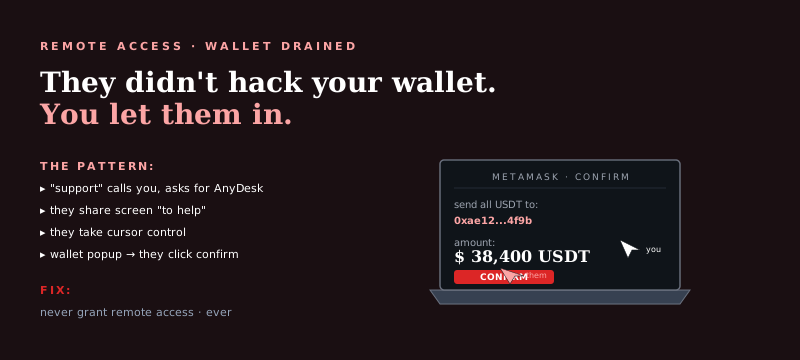
You let someone into your computer — maybe because they claimed to be tech support, maybe because a friend recommended them, maybe because a pop-up warned of a virus and a number to call. Now your crypto wallet or exchange account is empty.
This is one of the fastest-moving theft vectors in crypto because the attacker has complete access the moment the remote session starts. Here's exactly what happened and what to do about it right now.
If the remote session is still active — end it immediately. Disconnect the computer from the internet (unplug ethernet, disable WiFi). Do not use this computer for any financial accounts or password entry until it has been cleaned. Use a different device for everything in this guide.
What Just Happened
Remote access to your computer gives an attacker full visibility and control of everything on your screen. They could see open browser sessions, stored passwords, clipboard contents, wallet files, and exchange accounts in milliseconds. The theft was likely automated — pre-built scripts that scan for wallet files and initiate transactions run faster than any human could manually navigate. Your crypto was probably gone within minutes of the session starting.
How Remote Access Crypto Theft Works
Here's the sequence of what typically happens during a remote access crypto theft, from the moment access is established:
Screen and browser scanning
The attacker immediately scans visible browser tabs for open exchange sessions, wallet apps, and financial accounts. Any session still authenticated is an immediate target.
Credential harvesting
Browser-saved passwords, clipboard contents, and any visible credentials are captured. Many people store seed phrases or private keys in notes, documents, or password managers accessible from the desktop — these are targeted specifically.
Wallet file extraction
Software wallets like MetaMask store encrypted key files on your filesystem. These files can be extracted in seconds and brute-forced offline later if not immediately crackable.
Exchange account access
If you have an exchange account open in your browser, the attacker can initiate withdrawals directly. They may disable 2FA, change your email, or whitelist a withdrawal address during the session to enable future access.
Malware installation
Sophisticated attackers install keyloggers, persistent remote access backdoors, or credential stealers before ending the visible session. This gives them ongoing access even after you revoke the original remote connection.
On-chain fund movement
Stolen crypto is moved immediately through multiple wallets to obscure the trail. Funds typically pass through 3–7 intermediate wallets before reaching a cash-out point at an exchange. The blockchain records every hop permanently.
Secure Your Computer First
The device is compromised — treat it that way:
- Disconnect from the internet. Unplug ethernet, disable WiFi. Preventing ongoing access is the immediate priority.
- Do not use it for any financial accounts. Any credentials you enter on this device may be captured by installed keyloggers. Use a different device for all financial activity until this one is cleaned.
- Run a full malware scan. Use a reputable security tool (Malwarebytes, Windows Defender offline scan) from a bootable USB if possible to scan before the operating system loads.
- Consider a full wipe and reinstall. If you have reason to believe sophisticated malware was installed, a full OS reinstall is the only guarantee of a clean machine. Back up files to external storage first, but do not run executable files from the backup.
- Check for installed remote access software. Look in installed programs for AnyDesk, TeamViewer, LogMeIn, ConnectWise, or any other remote access tool you did not install yourself.
Secure Your Accounts
From a clean device (not the compromised computer), immediately:
- Change passwords on all financial accounts. Exchange accounts, bank accounts, email accounts. Prioritize in that order. Use a strong, unique password for each.
- Revoke API keys and connected apps on all your exchange accounts. Attackers sometimes create API keys or add OAuth connections to maintain access after you change your password.
- Enable or reset 2FA. If 2FA was active on your exchange account, check whether the attacker modified the 2FA settings during the session. Re-enroll 2FA from scratch on all financial accounts.
- Check withdrawal address whitelists. Some exchanges have withdrawal whitelist features — verify that no unauthorized addresses have been added.
- Move remaining crypto to a new wallet. Any wallet whose seed phrase or private key was on the compromised computer should be considered permanently compromised. Transfer all remaining assets to a fresh wallet created on a clean device.
- Contact your exchange's fraud team. Report the unauthorized access. Provide the transaction hash of the theft, the approximate time it occurred, and request that receiving wallets be flagged. Include your IC3 complaint number when you have it.
Can the Funds Be Traced?
Yes. The theft method — remote access — does not affect the on-chain traceability of the funds. Once the attacker moved your crypto, every subsequent transaction is permanently recorded on the blockchain.
A blockchain forensic trace follows the fund flow from your wallet through every subsequent hop, identifies clustering patterns that link wallets controlled by the same operator, and determines which exchange or service ultimately received the funds. If that exchange is regulated and holds the funds, there are legal mechanisms to pursue recovery.
See our detailed breakdown of how forensic investigators trace stolen crypto for what this process looks like. If your MetaMask was specifically targeted, see my MetaMask was drained — can it be traced.
Recovery likelihood depends on: how quickly you act, whether the funds are still on a regulated exchange, and whether that exchange is in a cooperative jurisdiction. See realistic recovery timelines for an honest breakdown by scenario.
How to Report It
- IC3.gov — FBI Internet Crime Complaint Center. File with the remote access tool used, the crypto amounts and transaction hashes, the wallet addresses involved, and how you were contacted. Use our step-by-step FBI reporting guide.
- FTC at ReportFraud.ftc.gov — Tech support scam reports feed consumer protection enforcement.
- Your exchange's fraud team — Report the unauthorized withdrawal and the receiving addresses. Request account review and wallet flagging.
- The remote access software provider — AnyDesk, TeamViewer, and similar tools have fraud abuse teams. Reporting the attacker's account ID (visible in session history) can help them disable the attacker's access to the platform.
Before cleaning your computer, document: the remote access tool that was used and any session IDs visible in history, the phone number or contact information of whoever requested remote access, any emails or pop-ups that initiated the contact, and every on-chain transaction hash from your wallet around the time of the theft. See our full guide on gathering transaction evidence.
Preventing It From Happening Again
- No legitimate company will call you to fix your computer or crypto account. Microsoft, Coinbase, MetaMask, and every other major platform do not make outbound support calls. Hang up.
- Do not install remote access software for anyone who contacts you first. If you need tech support, initiate contact with a company's official support channel yourself — never in response to a pop-up, email, or cold call.
- Hardware wallets eliminate the remote access risk for stored crypto. Funds in a hardware wallet cannot be stolen through remote access because transactions require physical confirmation on the device. See our guide on hardware wallet best practices.
- Never store seed phrases on any internet-connected device. Seed phrases written on paper and stored physically are not accessible to remote attackers. Any seed phrase stored in a document, note, or email is a permanent vulnerability.
Frequently Asked Questions
Can crypto stolen through remote access be traced?
Yes. The theft method doesn't affect on-chain traceability. Every transaction from your wallet creates a permanent blockchain record — wallet addresses, amounts, timestamps, and ultimately the exchange where funds landed. A forensic trace follows this trail.
What does a scammer do with remote access to steal crypto?
They scan for open exchange sessions, capture browser-saved passwords, extract wallet files, initiate withdrawals from authenticated accounts, and may install persistent malware. The entire process can take minutes once access is established.
What should I do first after remote access crypto theft?
Disconnect from the internet immediately. From a clean device, change all financial account passwords and revoke API keys. Contact your exchange's fraud team. File with IC3.gov. Get a forensic trace started while the on-chain trail is recent.
I was tricked by fake tech support — is this a known scam?
Yes — tech support scams are one of the most common remote access theft vectors. A pop-up, email, or call warns of a problem, you install a remote access tool, and your accounts are drained. The FBI received over $800 million in tech support scam losses in 2022 alone.
Is my computer still compromised after the scammer disconnected?
Possibly. Attackers often install persistent malware or keyloggers during the session that survive after the visible remote session ends. Do not use the compromised computer for financial activity until it has been fully wiped and reinstalled.
Crypto Stolen Through Remote Access? Start a Trace
We follow the on-chain trail from your wallet to wherever the funds went. Free consultation — we'll tell you exactly what's traceable and what recovery options exist for your case.